Thoughts in. Words out.
An Android keyboard that predicts and dictates on your phone
Lexo ranks your next word with a language model running on the phone, and types what you say as you say it. Nothing you type or say leaves the phone.
30 days free, everything unlocked. Then $9.99 once, not a subscription.
Built on the open-source FlorisBoard project. Five permissions, and none of them send what you type.
You typed
The quarterly review is scheduled for next Thursday at
It offers
noonthemidnighthalfoneten
You said
um can you uh send me the deck tomorrow morning
It typed
Can you send me the deck tomorrow morning?
Auto-clean is optional and off by default. It is "Auto-clean voice typing" in the Voice dictation settings.
Ways in
-
Tap
A language model reads the context and ranks what you're likely to type next, on top of a word-frequency prior and your own vocabulary.
-
Speak
Hold the mic and talk. An on-device recognizer types what you say as you say it, and optional Auto-clean strips fillers and adds punctuation and capitals.
-
Swipe
Swipe through a word instead of tapping it out. Glide typing, decoded by a neural classifier rather than a dictionary lookup. Part of Premium, so the 30-day trial covers it.
After each word the suggestion strip offers the likeliest next word, and one tap takes it. Typing a few letters narrows the offer.
Screen recording of Lexo 2.0.40 in the setup screen's practice box: one word swiped, a few letters typed, the rest tapped from the suggestion strip. Recorded on an emulator, so the motion is choppier than on a phone.


What's actually running
-
Typing suggestions
In English, a fine-tuned SmolLM2-360M with a word-scoring head, run through llama.cpp on the CPU inside the keyboard process. The other eight languages each have their own smaller model. One language is resident at a time. A lighter English model is the "Battery life" choice under Optimize for in Settings.
-
Dictation
On-device recognizers run through sherpa-onnx behind a Silero voice-activity gate. English, Spanish, Portuguese, German and French use NVIDIA Parakeet, about 0.6B parameters. Swedish uses KB-Whisper-small, and Polish, Turkish and Czech use Whisper large-v3 turbo.
-
Dictation cleanup
Off by default. Turn on Auto-clean and, in English, a small ELECTRA-small tagger marks fillers, stutters, capitals and punctuation on the transcript, then fixed rules finish the job. If it is unsure it leaves your words as recognized.
-
First-run download
Setup pulls the typing model for your language over Wi-Fi, 545 MB in English and 135 MB to 193 MB in the others, verified by md5. Voice is opt-in and downloads separately the first time you use the mic. The models live in the app's private files directory, so app updates stay small and never re-download them.
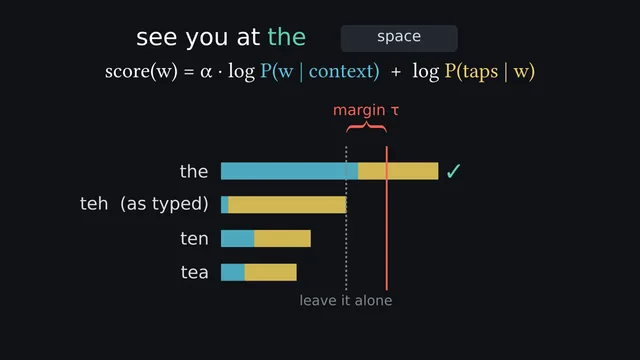 Watch: how Lexo works, 5 min
Taps, the language model, autocorrect, dictation and grammar checks, with captions and a transcript.
Watch: how Lexo works, 5 min
Taps, the language model, autocorrect, dictation and grammar checks, with captions and a transcript.
The model choices, including the first design and what replaced it, are in the build note and the dictation write-up.
None of it leaves the phone
The models run locally, so your text and your audio have nowhere to go. That's a claim like any other, and it should be checkable rather than promised.
Lexo's own manifest declares exactly five permissions: RECORD_AUDIO for dictation, VIBRATE for haptics, POST_NOTIFICATIONS for download progress, plus INTERNET and ACCESS_NETWORK_STATE. The installed app's list in Android's settings can show a few more that the Play billing library and Android itself add, and none of them gives the app your text or audio. So point PCAPdroid or NetGuard at Lexo: past the model download and one anonymous request after install (Play install source tags and app version, nothing else), typing and dictating generate no traffic at all.
Longer version, including what I can't prove to you: is Lexo safe, and what does it collect.
Where it's weak
- Swipe typing is new. It is the youngest part of Lexo, and Gboard and SwiftKey have had far longer to tune theirs.
- English is much stronger than the rest. Eight other languages ship, and the gap is real. Closing it is the current focus.
- The download is big. 545 MB in English to set up typing, and a separate, further download the first time you use the mic.
- De-Googled ROMs are rough. Licensing and billing verification lean on Play services, so purchases can fail to activate on Huawei, Aurora, LineageOS and GrapheneOS.
- Dictation cleanup is off by default. It isn't good enough to be the default yet, so fresh installs get the transcript as recognized.
If none of that puts you off, the trial is the fastest way to check the rest.
Get it on Google PlayTry everything for 30 days
30 days free, then one payment
$9.99 once
- Everything unlocked for the first 30 days. No card, nothing to cancel
- The suggestion strip, next-word prediction and autocorrect from the on-device language model
- On-device voice dictation, and glide typing
- Then $9.99 once. Not a subscription. No ads, either way.
After the trial, if you don't buy
An ordinary keyboard
- Layouts, language switching, emoji, clipboard history, themes
- One-handed mode, and key sounds, vibration and gestures you can set
- No suggestion strip and no autocorrect: those run on the models, and the models are the paid part
- No countdown, no locked keyboard, no ads
The one-time price is lower in many countries, and Google Play shows the one for yours.
Being straight about it: Lexo is a paid keyboard. Almost everything that makes it different from the keyboard you already have is behind the unlock, and what an unpaid install keeps is an ordinary keyboard.
Getting started
- Install it from Play. The app itself is small.
- Enable Lexo, then switch to it. Android puts this under Languages and input, On-screen keyboard.
- Join Wi-Fi once and let the typing model download. 545 MB in English, one time. Voice downloads separately, the first time you use the mic.
Thirty days free, then $9.99 once.
Get it on Google PlayQuestions
How do I switch to Lexo after installing it?
Android hides this in two steps. Enable Lexo under System settings, Languages and input, On-screen keyboard, then tap the keyboard icon in the navigation bar to switch to it the first time. Lexo walks you through both on first launch.
Is it a subscription?
No. Everything is unlocked free for 30 days, and after that the unlock is $9.99 once. There's no recurring charge, and no ads at any point.
Does it work without an internet connection?
Yes, once the one-time model download is done. Typing, prediction and dictation all run on the phone, so airplane mode is the simplest way to check that for yourself.
Does anything I type get sent anywhere?
No. Lexo's own manifest declares five permissions and none of them carry your text or your audio. Point PCAPdroid or NetGuard at the app: past the one-time model download, typing and dictating generate no traffic at all.
Writing
-
Android keyboards compared, including where Lexo loses
Lexo against Gboard, SwiftKey, FUTO and others.
-
Gboard vs Lexo
What Google's own pages say Gboard sends, what Lexo does on the phone, and who should stay put.
-
SwiftKey vs Lexo
What Microsoft's documents say SwiftKey collects, set against what Lexo keeps on the phone.
-
Autocorrect not working on Android: what to check
The settings and dictionary problems that switch autocorrect off, in the order to check them.
-
Voice typing without internet on Android
Which Android voice typing works offline, what has to be downloaded first, and where it stops.
-
How to check what your Android keyboard sends
Three checks you can run yourself: permissions, network use and the keyboard's own privacy policy.
-
Offline dictation on Android, end to end
The voice pipeline, and why the cleanup stage fails open.
-
Fitting a language model inside an Android keyboard
The first 0.5B design, what ships now, the download sizes and the packet capture that checks the privacy claim.